




In today’s modern manufacturing environment, where customer demands are constantly changing and the pressure for on-time delivery is mounting, planning with Excel or manual methods has become overwhelming. To put an end to inconsistent machine runtimes, phantom inventory, and schedule delays, factories are turning to APS (Advanced Planning and Scheduling) software.
So, what exactly is APS? How does it differ from traditional systems, and how can applying APS “unblock” the production flow? This article from InfoAsia provides a comprehensive and in-depth overview.
1. Overview of the APS Module: The “Brain” of Smart Scheduling
APS (Advanced Planning and Scheduling) is not just a simple scheduling tool. It is a specialized software platform that helps factories automate the calculation, allocation, and optimization of resources (raw materials, machine capacity, labor) to precisely meet order requirements at the lowest cost.
The core difference between APS and traditional ERP systems (which often assume infinite resources) lies in its capacity for Finite Capacity Planning, scheduling based on realistic constraints. The APS system was created to solve specific manufacturing challenges:
- A highly volatile production environment where rush orders frequently interrupt.
- A diverse product portfolio (High Mix – Low Volume) with complex, multi-level Bill of Materials (BOM) structures.
- Make-to-Order manufacturing models requiring high customization.
- Factories with significant machinery investments but limited production capacity due to bottlenecks at certain stages.

2. Outstanding Features of APS Software
A world-class APS system does not operate in isolation; it is often the core of Comprehensive Production Management solutions (such as fCIM – integrated lifecycle management from design to execution). The features that build the power of APS include:
2.1 Real-Time Synchronization and Optimal Resource Management
APS doesn’t just create plans that “sit on paper.” It continuously updates signals from the shop floor regarding actual inventory status, machine shift progress, and labor availability. As a result, the system provides an accurate, down-to-the-minute forecast of when an order will be completed. If a machine breaks down, APS instantly recalculates the entire schedule so the production flow remains uninterrupted.
2.2 Superior Error Detection and Early Warning Capabilities
Instead of waiting until the end of the day for a manager to realize a product code is delayed, APS acts as an early warning radar system. When it detects that actual progress is lagging behind the plan or a critical material is in shortage, the software proactively sends out alerts. This helps management quickly reprioritize production orders, channeling resources into the most critical VIP orders to protect the company’s reputation with customers.
Moreover, rather than forcing humans to devise a solution, APS uses algorithms to automatically suggest options (e.g., switching to Machine B, changing shifts for overtime, etc.) and ranks them based on cost and time optimization criteria.
3. Core Functionalities of APS Software
3.1 What-If Analysis: Assessing Impacts and Outcomes
In production management, every decision carries inherent risks. The “What-If” feature of APS allows users to create simulation scenarios before applying them in reality.
- If Customer A requests delivery 3 days earlier today, what will happen?
- If the painting line is stopped for 4 hours of maintenance, which orders will be delayed?
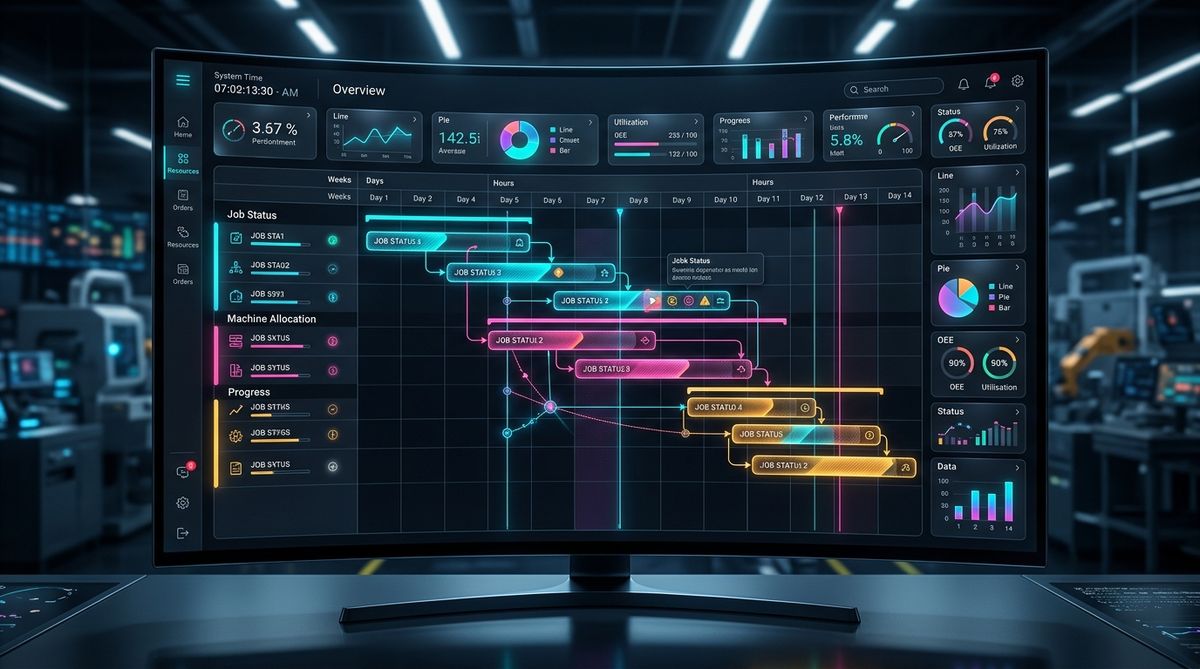
The system instantly displays the results of these changes on an intuitive Gantt chart platform. This empowers planners to test countless scenarios, compare pros and cons, and select the safest option to publish as the official production schedule.
3.2 Plan Optimization: Developing Strategies Based on Available Resources
APS provides a flexible environment that allows for smooth transitions between manufacturing strategies: from Make-to-Stock to Make-to-Order. The APS algorithm dives into every product detail to suggest ways to group orders with shared characteristics (same mold, same paint color) to minimize Setup/Changeover time, thereby saving costs and increasing line productivity.
3.3 Comprehensive Management of Production Lines and Workforce Variables
A factory is a complex network of constraints: machinery, molds, worker skills, and safety regulations.
APS allows users to configure and toggle these constraints at will. For example, you can designate a cluster of CNC machines exclusively for high-precision products. The flexibility in schedule creation makes it easy for managers to compensate for sudden personnel shortages (e.g., a main operator taking leave) by reallocating work to other machine stations.
3.4 Measuring the Success of Scheduling Plans
Excellent planning must go hand-in-hand with validation tools. APS provides a comprehensive reporting system and diverse graphical dashboards (Gantt, pie charts, bar charts) to track Key Performance Indicators (KPIs):
- On-Time Delivery (OTD) rate.
- Resource Utilization efficiency.
- Fluctuation trends of raw material and Work-In-Process (WIP) inventory.
Closely monitoring data not only helps evaluate the success of a production scenario but also serves as a foundation for continuous review, eliminating bottlenecks to improve processes.
4. Exceptional Benefits of APS Software
4.1 Building Smart Order Query Strategies
Modern APS systems integrate Artificial Intelligence (AI) to optimize how factories accept orders. Based on historical data, the system automatically categorizes and evaluates the profitability of each new order. It prioritizes scheduling for VIP customers or orders with the highest profit margins during periods of abundant resources, ensuring the factory always operates at its most valuable state.
4.2 Streamlining Production Processes with Comprehensive Data Integration
Production cannot operate in isolation. APS acts as a “super connector,” integrating seamlessly with other enterprise management software (ERP, MES, WMS) to synchronize Master Data. As a result, information regarding inventory, production orders, and BOMs is consistent across the entire system, creating a zero-latency information flow that strongly supports executive decision-making.
4.3 Smart Connectivity: Seamless Integration with Management Platforms (e.g., Opcenter)
When APS is embedded into a high-level management ecosystem (e.g., Siemens Opcenter), the factory is equipped with comprehensive supply chain management capabilities. This synergy covers every aspect: from advanced planning and shop floor execution tracking to QA/QC quality management and logistics. This is a solid stepping stone that helps businesses minimize costs, accelerate performance, and meet the rigorous demands of the global market.
5. Conclusion
In the context of Industry 4.0, APS software is no longer a “nice-to-have add-on” but has become a “mandatory weapon” to thoroughly resolve order jams, delayed deliveries, and excess inventory. With its ability to schedule flexibly based on realistic constraints and the analytical power of What-If scenario simulation, APS is the “brain” that architects a factory operating with outstanding precision and speed.
If your enterprise is looking for a solution to optimize productivity and standardize production scheduling processes, investing in modern APS solutions is the most solid step toward a sustainable Smart Factory model!
6. Frequently Asked Questions (FAQs)
Q1: Our factory’s Bill of Materials (BOM) data and Routing times are not yet accurately measured, can we still run APS software?
A1: If the input data is “Garbage in,” the output plan will also be “Garbage out.” However, you don’t need 100% perfect data from day one. The system allows you to set buffer times. During operation, the integrated MES system will collect actual machine runtimes to continuously refine the Routing factors, making them increasingly accurate over time.
Q2: Does the software automate planning 100%, or is human (Planner) intervention still required?
A2: The software takes on the heavy lifting of calculating complex algorithms and proposing optimal solutions based on logic. However, the final decision-making authority always remains with humans. Planners can still use drag-and-drop on the chart to flexibly handle “intuitive” or exceptional situations that the computer cannot foresee.
Q3: Can the system distinguish the skills of individual workers when allocating tasks?
A3: Absolutely. The system’s algorithm doesn’t just manage machinery; it also handles Human Resources. You can define rules such as “Arc welding tasks can only be assigned to personnel with Skill Level 4 or higher.” The system will automatically exclude lower-level workers from the schedule for that shift.

InfoAsia Việt Nam trở thành nhà cung cấp dịch vụ phần mềm số hóa nhà máy sản xuất cho thương hiệu giày hàng đầu thế giới NEW BALANCE
Công ty TNHH Mây Tre Hà Linh
SAP ERP MES and IOT Project for FVIV Factor
Buwon Industry Co, Ltd
KANGLONGDA VIETNAM PROTECTION TECHNOLOGY COMPANY LIMITED
Shini Group
TA TING PLASTIC (HAI DUONG ) CO., LTD
CÔNG TY TNHH MTV BIÊN HOA SCM