




Mr. Nguyen Van A, the CEO of a 500-employee electronics manufacturing plant, used to face an absolute nightmare at the end of every month: Inventory numbers scattered across disparate software mismatched physical stock by up to 15%, the production floor constantly complained about material shortages, yet the purchasing department’s reports claimed everything was fully procured. The deepest pain wasn’t just the “ghost” numbers presented to the board of directors, but the reality that no one knew exactly where the root cause (the bottleneck) was hidden across the lengthy workflow—from order receipt, planning, and purchasing, all the way to production and dispatch. This fragmentation in the information flow caused the factory to constantly miss delivery deadlines, waste critical resources, and lose the trust of key clients. If your factory is also struggling to piece together these disconnected data silos, it’s time for a single, unified “brain” to orchestrate operations.
Key Takeaways: – The SAP ERP system, combined with MES, delivers a Single Source of Truth, completely eradicating “data silos” between Purchasing, Warehouse, Production, and Accounting departments. – Through SAP ERP MRP and the Beas APS Dashboard, the system automatically calculates material requirements and schedules optimal production based on finite capacity, eliminating the high-risk manual planning on Excel. – Quality and progress control are executed in real-time at every workstation via the Beas Manufacturing Terminal, enabling early detection of defective goods (NG) and effectively improving the Overall Equipment Effectiveness (OEE) index. – Hidden costs from excess inventory, material waste, and machine downtime are minimized, pushing the factory closer to a true Lean Manufacturing model. – The shift from a reactive management model (waiting for defects to fix them, waiting for shortages to buy) to a proactive governance model empowers the leadership team to make strategic decisions based on 100% transparent and visual data.

1. The Pain of Fragmented Management and the Rise of a Central “Brain”
1.1 The Collapse of “Data Silos”
In factories operating under traditional methods, each department typically uses a distinct tool: Accounting relies on localized software, Production tracks progress on whiteboards or Excel sheets, and the Warehouse uses paper-based stock cards. This creates isolated “data silos” with no direct connectivity, leading to massive information latency. When the sales team receives an urgent order, they have to wait for the warehouse to manually check inventory, wait for production to confirm if machines are available, and wait for purchasing to quote material prices. This process not only wastes precious hours but is also highly prone to errors due to repetitive manual data entry. Ultimately, by the time the data is aggregated, it has become “cold” information with no value for real-time decision-making, leaving the factory perpetually reactive to market shifts.
1.2 SAP ERP: The Solution to the Centralized Data Puzzle
The SAP ERP system thoroughly resolves this issue by establishing a Single Source of Truth for the entire enterprise. When a Sales Order is newly created in the system, all relevant departments immediately receive the information without the need for internal emails or phone calls. The warehouse knows exactly what to prepare for dispatch, Production sees the upcoming workload to schedule manpower, and Accounting has the data ready to issue invoices. By digitizing the entire flow of information, SAP ERP completely eliminates communication delays, ensuring that every individual in the factory—from the shop floor operator to the CEO—is looking at the exact same real-time figures simultaneously.
2. How SAP ERP Optimizes Core Factory Workflows
2.1 Automating Material Requirements with SAP ERP MRP
Material Requirements Planning (MRP) on Excel is a highly risky endeavor when a factory manages thousands of material codes, complex multi-level Bill of Materials (BOM), and varying lead times from different suppliers. SAP ERP MRP tackles this problem by automatically cross-referencing sales orders, projected production schedules, current inventory, and even in-transit stock to precisely calculate what needs to be purchased, how much, and when. It does not merely perform simple subtraction; it evaluates requirements based on Safety Stock levels and Minimum Order Quantities (MOQ), thereby automatically generating fully optimized Purchase Requests. This prevents the factory from tying up capital in excessive, unnecessary raw materials while simultaneously avoiding the risk of sudden machine downtime due to critical material shortages.
2.2 Intelligent Production Scheduling via Beas APS Dashboard
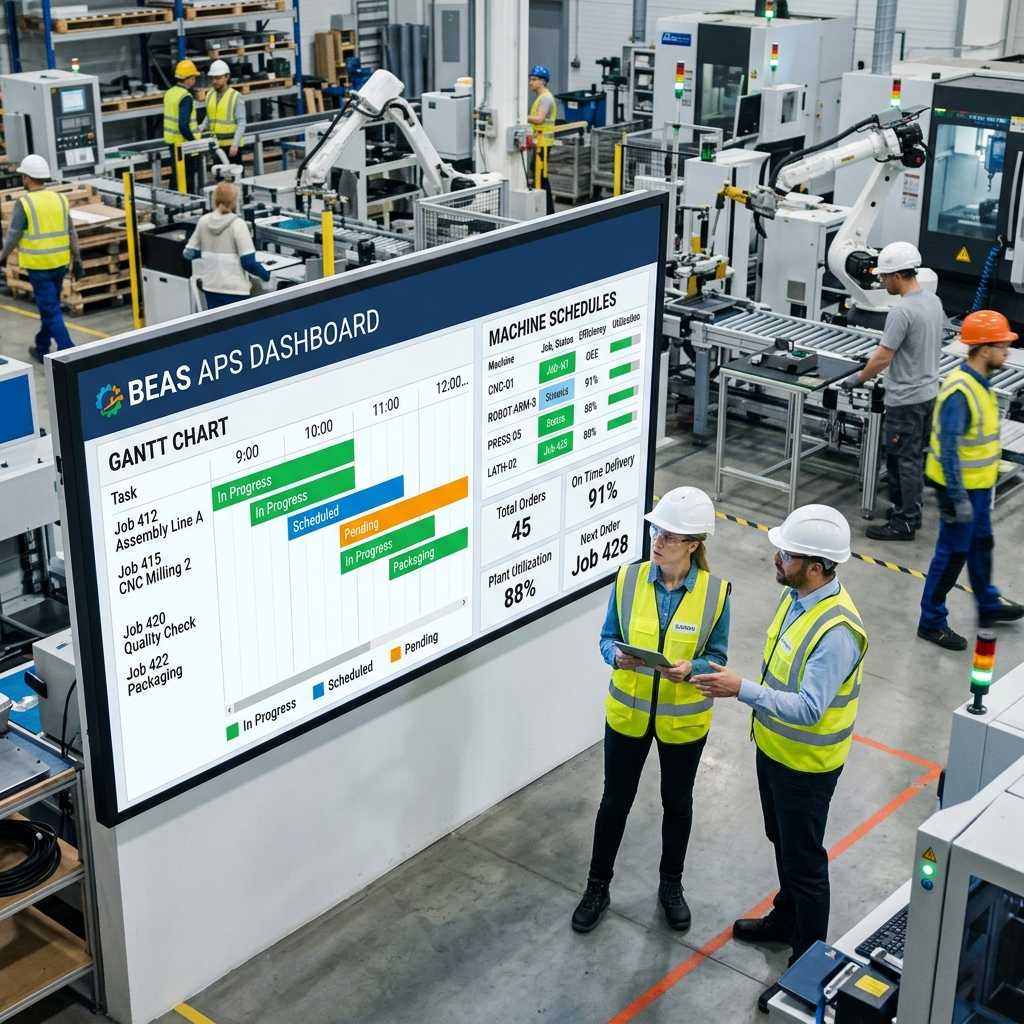
Production scheduling is not just about assigning tasks; it is the art of balancing delivery deadlines with the factory’s actual capabilities. Traditional management tools often apply an infinite capacity model, meaning they simply cram tasks into a given day without considering whether the machines or operators can actually handle the load. The Beas APS Dashboard integrated within SAP ERP entirely changes this paradigm using Finite Capacity Scheduling algorithms. The system automatically allocates Work Orders based on the true capacity of each machine, operator shifts, and scheduled maintenance times, allowing management to instantly spot potential “bottlenecks” before they occur. Thanks to the visual Gantt chart interface, planners can easily drag and drop to adjust priorities, and the system dynamically recalculates the progress of all subsequent affected routing steps.
2.3 Real-time Data Collection via Beas Manufacturing Terminal
One of the biggest blind spots in manufacturing management is the lack of accurate, up-to-date information fed from the shop floor. To resolve this, the combined SAP ERP and MES solution provides the Beas Manufacturing Terminal—a specialized workstation interface designed for operators to interact directly at the assembly line. By simply scanning a Barcode/RFID or tapping a touchscreen, operators can effortlessly report job starts, log good quantities, report defective parts (NG), and declare machine downtime causes. This data is instantly pushed to the central system, allowing the plant manager to monitor production progress in real-time, automatically calculate Overall Equipment Effectiveness (OEE), and implement Lean Manufacturing countermeasures immediately rather than waiting until the end of the shift.

3. Comparison Table: Fragmented Management vs. Unified Governance with SAP ERP
| Criteria | Management via Excel / Disparate Software | Unified Governance via SAP ERP & MES |
|---|---|---|
| Data Synchronization | Fragmented; data is split into multiple “silos.” High risk of errors during manual transcription between files. | 100% centralized on a Single Source of Truth. All changes are updated in real-time. |
| Material Planning (MRP) | Complex manual calculations taking days; high risk of errors leading to material excess or shortages. | SAP ERP MRP automatically calculates requirements based on stock, orders, and BOMs within minutes with absolute precision. |
| Production Scheduling | Often based on intuition or infinite capacity assumptions; unable to foresee bottlenecks. | Beas APS Dashboard schedules based on Finite Capacity, visually displayed via dynamic Gantt charts. |
| Shop Floor Control | Reliant on end-of-day paper reports; data is often “beautified” or heavily delayed. | Real-time data collection via Beas Manufacturing Terminal using barcodes; continuous OEE monitoring. |
| Operational Costs | Massive hidden costs due to excess inventory, waiting time waste, and production defects. | Optimizes inventory, minimizes waste (Lean Manufacturing), and boosts inventory turnover and overall profitability. |
4. 5 Real-World Case Studies of SAP ERP Efficiency
Case 1: Eliminating 100% of Over-Purchasing through Accurate MRP. Plastics Factory A frequently suffered from tons of excess shrink wrap inventory because purchasing staff made manual calculation errors. Upon implementing SAP ERP MRP, the system accurately deducted safety stock and Purchasing in Transit, helping the company reduce inventory holding costs by 22% in just the first quarter.
Case 2: Overcoming Delays with Beas APS Dashboard. Textile Plant B was constantly penalized by clients for late deliveries because specialized weaving machines were frequently overloaded without the planner’s knowledge. By applying the Finite Capacity scheduling feature of Beas APS, they immediately identified a bottleneck on Line 3 and proactively shifted the load to other machines, boosting their On-Time In-Full (OTIF) rate from 75% to 98%.
Case 3: Real-Time Defect Monitoring with the Terminal. At Mechanical Factory C, defects used to be hidden until the end-of-month report, severely inflating production costs. When the Beas Manufacturing Terminal was deployed at every CNC milling machine, the system instantly triggered an alert on the manager’s screen the moment the defect rate exceeded the 2% threshold. This allowed them to halt the line and recalibrate the cutting tool immediately, saving hundreds of millions of VND in scrap materials.
Case 4: Calculating Product Costs Down to the Penny. Chemical Plant D struggled to accurately allocate labor and energy consumption costs to specific product batches. With SAP ERP, every machine run time and labor hour reported from the shop floor is directly linked to the specific Work Order, enabling the accounting department to automatically generate precise Actual Costing, which in turn allows for highly competitive pricing strategies.
Case 5: Lightning-Fast Traceability During Incidents. When a batch of food products from Company E received a quality complaint from a customer, thanks to the Lot/Batch barcode management on SAP ERP, it took them less than 3 minutes to trace backward to see exactly which raw material batch was used, which supplier it came from, and on what date. This rapid traceability allowed them to isolate the exact defective batch instead of initiating a costly nationwide product recall.
5. Frequently Asked Questions (FAQs)
Q: If my factory has a highly specialized production process and frequently changes Bill of Materials (BOM), can SAP ERP flexibly accommodate this? A: Absolutely. SAP ERP supports complex multi-level BOM structures and manages multiple Versions. You can easily set up a specific BOM for a particular Work Order or flexibly adjust component ratios based on actual conditions on the floor without permanently altering the master BOM structure.
Q: Does implementing an ERP solution require my shop floor workers to be highly computer-literate? My older operators are very tech-averse. A: Not at all. The Beas Manufacturing Terminal interface is designed to be extremely minimalist, featuring large buttons on a touchscreen. Workers only need to perform 1 or 2 actions, such as scanning a Barcode/RFID on their ID badge or Work Order, and the system automatically logs the transaction. It requires no typing skills or deep IT knowledge.
Q: How does the system know when a machine’s actual capacity drops due to maintenance or a break-in period? A: Within the Beas APS Dashboard module, you can declare scheduled maintenance periods as well as the actual efficiency factor of individual machines (e.g., Machine A is currently operating at only 80% capacity). The system will use this updated data to either extend the completion time of the job or proactively route the workload to a healthier machine, ensuring the schedule always reflects reality.
Q: We are using a fairly stable localized accounting software; can we just purchase the SAP manufacturing software and integrate them? A: Technically, SAP provides open APIs (like the Service Layer) for third-party integration. However, maintaining two parallel systems defeats the core value of a “Single Source of Truth.” It often leads to data conflicts between finance, warehouse, and production, while incurring high long-term integration maintenance costs. A comprehensive upgrade to SAP ERP is a far more optimal and strategic decision.
Q: What happens if the MRP system triggers a purchase request for materials, but the physical warehouse is actually empty due to unrecorded shrinkage? A: For SAP ERP MRP to run accurately, a prerequisite is maintaining strict Inventory Accuracy. This is exactly why factories must utilize barcode scanners and perform regular Cycle Counts using the SAP system. This ensures that the system stock and the physical stock always match, which is the foundation for the MRP to generate precise purchasing recommendations.
Register for a tailored SAP ERP Demo session customized specifically for your factory’s operational workflow at INFOASIA!

InfoAsia Việt Nam trở thành nhà cung cấp dịch vụ phần mềm số hóa nhà máy sản xuất cho thương hiệu giày hàng đầu thế giới NEW BALANCE
Công ty TNHH Mây Tre Hà Linh
SAP ERP MES and IOT Project for FVIV Factor
Buwon Industry Co, Ltd
KANGLONGDA VIETNAM PROTECTION TECHNOLOGY COMPANY LIMITED
Shini Group
TA TING PLASTIC (HAI DUONG ) CO., LTD
CÔNG TY TNHH MTV BIÊN HOA SCM