




Last week, I received an SOS call from the director of an industrial water pump assembly plant in the high-tech park. His company was falling into a “paper wall” crisis. Each pump has up to 4 levels of Bill of Materials (BOM), comprising 300 large and small parts from cast iron casings, stators, rotors, down to every single screw. When the R&D department changed the specifications of a rubber gasket, the Planning department had to manually hunt through hundreds of Excel files to update the BOM for all pump models using that gasket. The consequence was that a delay in updating a file led the warehouse to mistakenly purchase 5,000 incorrectly sized gaskets, forcing the assembly line to halt for 3 days waiting for replacements. This incident cost them tens of thousands of dollars and damaged their reputation with partners. This is the exact price to pay when using primitive tools to manage a massive and cross-linked data structure like a multi-level BOM.
Key Takeaways:
Managing a multi-level BOM (Bill of Materials) is not simply about listing materials; it’s about digitizing the entire DNA of a product. The combination of SAP Business One and the Beas Manufacturing solution (from Boyum Solutions) provides an absolutely specialized BOM management platform. Instead of using flat lists in Excel, the system builds the BOM as an intuitive Tree Structure, directly linked to machining operations (Routing). Whenever there is an Engineering Change from the R&D department, Beas Manufacturing allows for Mass Updates and automatically creates new BOM Revisions. This ensures that data across R&D, Warehouse, Purchasing, and the Shop Floor is always synchronized in real-time, completely eliminating the risk of buying wrong materials or producing outdated versions.
1. Tree Structure BOM and Routing Integration
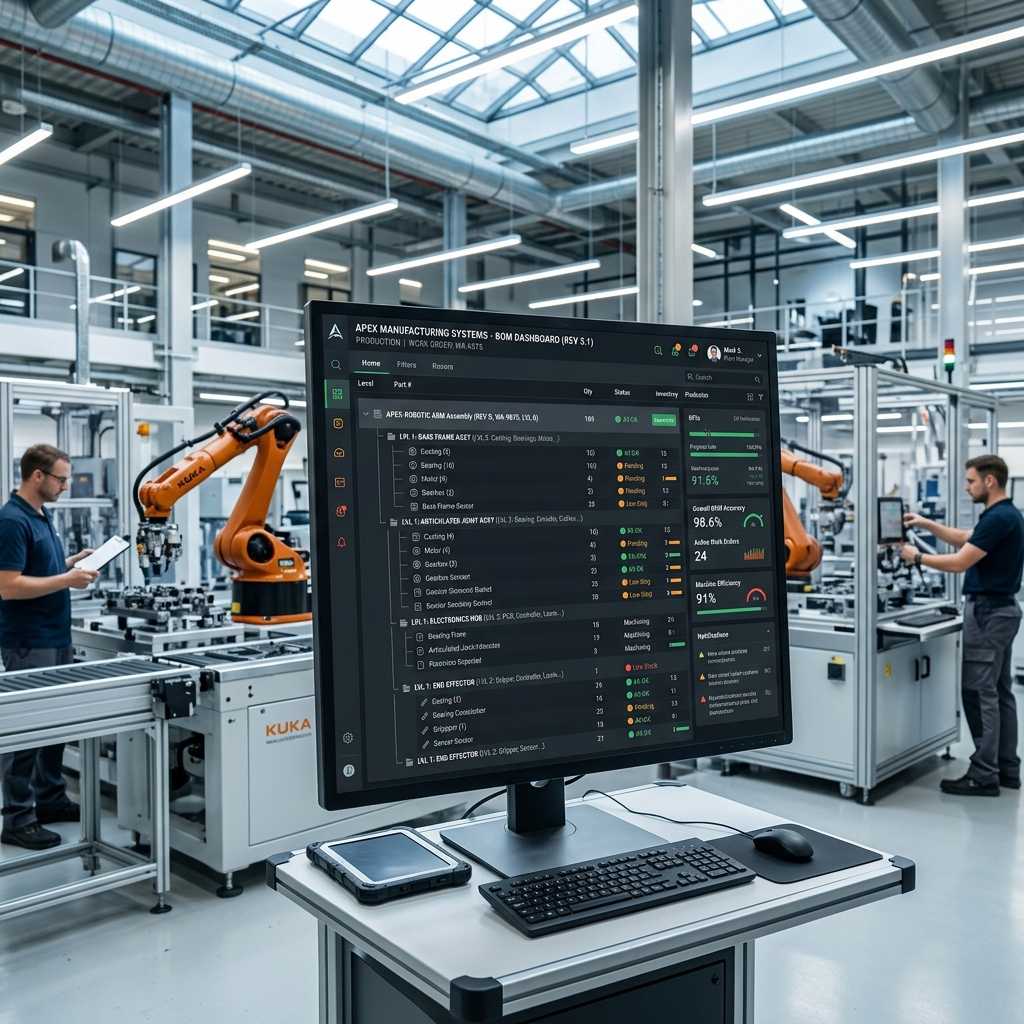
The most common mistake of cheap ERP software is treating the BOM like a flat recipe. For complex manufacturing industries, a Sub-assembly is created from multiple different materials and has its own production process. Beas Manufacturing solves this problem by displaying multi-level BOMs as an intuitive Tree Structure. You can Expand or Collapse each detailed sub-assembly directly on a single screen. Even better, Boyum Solutions’ system tightly integrates the BOM with Routing. This means the system not only knows “what materials are needed,” but also knows exactly “at which operation and on which machine that material will be consumed.” When issuing a Work Order, the warehouse only needs to issue the specific components required for Operation 1, rather than dumping all materials onto the shop floor at once, which causes loss and clutter.

2. Revision Management and Engineering Change Control
Throughout a product’s lifecycle, changing designs to improve quality or reduce costs is mandatory. When using Excel, every time R&D changes a design, the factory gets an additional “BOM_v2_Final” file, then “BOM_v3_Final_For_Real.” Very quickly, no one knows which one is the original. With the Beas Manufacturing module, all changes are strictly controlled using the Revision Management feature. When you change a component, the system automatically saves the old version as history and assigns a new version code (e.g., Rev 1.1). Furthermore, the Engineering Change Request feature clearly dictates: The new BOM version is only applied to the shop floor after the Production Manager clicks electronic Approval. Work Orders that are already in progress on the shop floor will not be affected, ensuring absolute system stability.
3. Mass Update – The Savior of the Planning Department
Let’s return to the rubber gasket example at the beginning of the article. That gasket is a Common Part used across 50 different pump models. When replacing this gasket code with a new one, the planner cannot open each of the 50 pump BOMs to delete the old row and insert the new one. Beas Manufacturing’s “Mass Update” feature was born to solve this. With just a few mouse clicks, you select the command “Replace Item A with Item B,” and the system will automatically scan the entire SAP Business One BOM database and update the changes for all 50 pump models in just 5 seconds. This capability not only saves hundreds of hours of manual work but also 100% eliminates risks caused by typing errors (human error).
Comparison Table: BOM Management in Excel vs. SAP & Beas Manufacturing
| Criteria | BOM Management via Excel / Basic ERP | BOM Management via SAP & Beas Manufacturing |
|---|---|---|
| Data Structure | Flat list format, hard to see sub-assemblies. | Multi-level Tree structure, visual drag-and-drop. |
| Operation Integration | Disconnected from machine processes. | Links materials to specific machines/operations (Routing). |
| Revision Control | Manual file naming, highly prone to mix-ups. | Automatic Version coding with electronic Approval. |
| Cost Calculation | Must re-run VLOOKUP formulas for all parts. | Automatic Roll-up from the smallest part to the finished good. |
| Updating Component Changes | Hunting and editing each file manually. | Mass Update feature edits mass BOMs in 5 seconds. |
4. Five Real-World Examples Proving the Power of SAP & Beas BOM Management
- Case study 1: Electric bicycle assembly plant. An e-bike model has a BOM up to 5 levels deep, from the frame and wheels to the lithium battery pack. Previously, when calculating the estimated cost for a new model, the accounting department took 2 days to get quotes for every screw to piece together. After using Beas Manufacturing, the system automatically rolls up material and labor costs from the deepest BOM level straight to the level 1 finished product. Quoting customers dropped from 2 days to 5 minutes, with 99.9% accuracy.
- Case study 2: Wooden furniture manufacturing shop. Customers often request last-minute changes to paint colors or sofa upholstery fabrics. R&D created Product Configurators in Beas. The Sales department only needs to select tick-boxes (e.g., Velvet fabric, Oak legs), and the system automatically generates an accurate production BOM without needing to redraw the design, helping push production orders to the floor 3 times faster.
- Case study 3: Industrial electrical cabinet factory. Every electrical cabinet is a unique project (Project-based). Using cheap software, the shop had to constantly create new finished good codes, turning the database into garbage. With SAP and Beas, the factory utilizes the “Order-specific BOM” feature. They use a standard BOM as a baseline and modify the drawing exclusively for that specific order without affecting the master BOM in the main directory, keeping master data perfectly clean.
- Case study 4: Household plastic injection shop. A batch of recycled ABS plastic pellets has a 5% higher wastage rate than virgin ABS. The shop manager configured the Scrap Factor feature directly on the Beas multi-level BOM. When running MRP (Material Requirements Planning), the system automatically adds 5% to the required purchase quantity, ensuring they never run short of materials mid-way while the machine is injecting.
- Case study 5: Agricultural machinery manufacturing plant. A gearbox component had a design flaw and the brand requested immediate cessation of use (Phase-out). Thanks to the Beas Mass Update feature, the administrator issued a command banning the use of this item code across the entire system. Instantly, 120 tiller models using this gearbox were flagged red by the system, locking the ability to create Work Orders until R&D updated the new gearbox code, completely preventing the risk of mass-producing defective products.
Frequently Asked Questions (FAQs) About Multi-level BOM Implementation
My company has thousands of BOM files on Excel, how do I bring them into SAP & Beas without typing them all over again?
The SAP Business One system supports Data Transfer Workbench (DTW) tools that allow for mass data importing. For complex multi-level structures, implementation consultants will provide you with a standard template form. You simply copy the data into the template, and the system will automatically read the Level 1 and Level 2 structures and map them accurately into the software.
Is a Manufacturing BOM (MBOM) in Beas different from the R&D department’s Engineering BOM (EBOM)?
There is a massive difference. An EBOM (from software like AutoCAD, SolidWorks) only cares about physical shape and structure. Meanwhile, the MBOM in Beas Manufacturing adds the “How to produce” element. Beas allows you to import the EBOM, after which manufacturing engineers will “mold” it, adding auxiliary materials (like glue, lubricating grease) and attaching them to machine operations to create an executable MBOM.
When creating a Work Order from a multi-level BOM, does the system merge identical Sub-assemblies to produce them all at once?
That is exactly the power of MRP in Beas. If you receive 3 different orders that all use the same “Level 2 Motor Assembly,” the system will automatically merge the requirements of these 3 orders into one master Work Order for the Motor Assembly. This helps the milling/lathe machine only need to be setup once, saving maximum changeover time.
How can I secure the BOM structure so shop floor workers cannot see the core formula?
SAP Business One and Beas possess an Authorization system detailed down to every data field. You can set it so the Production Manager sees the entire multi-level BOM, while the Terminal screen of a welding station worker only displays the 2 iron components needed for their specific operation, completely hiding the chemical mixing formulas used in previous stages.
Can the system manage Alternative Items?
Absolutely supported. If item A suffers a supply chain disruption, you can declare item B as an Alternative Item on the BOM. When running a production order and the warehouse reports item A is out of stock, Beas will automatically suggest issuing item B. This feature ensures the production flow is never interrupted just because a single screw is temporarily out of stock.

InfoAsia Việt Nam trở thành nhà cung cấp dịch vụ phần mềm số hóa nhà máy sản xuất cho thương hiệu giày hàng đầu thế giới NEW BALANCE
Công ty TNHH Mây Tre Hà Linh
SAP ERP MES and IOT Project for FVIV Factor
Buwon Industry Co, Ltd
KANGLONGDA VIETNAM PROTECTION TECHNOLOGY COMPANY LIMITED
Shini Group
TA TING PLASTIC (HAI DUONG ) CO., LTD
CÔNG TY TNHH MTV BIÊN HOA SCM